ReplicatedReplacingMergeTree
MarkdownView HTML version
Now you have a large single node cluster with a [ReplacingMergeTree](https://blog.duyet.net/2024/06/clickhouse-replacingmergetree.html) table that can deduplicate itself. This time, you need more replicated nodes to serve more data users or improve the high availability.
- [Cluster setup via ClickHouse Operator](#cluster-setup-via-clickhouse-operator)
- [Create Replicated table](#create-replicated-table)
- [Data Insert](#data-insert)
- [Manage replication](#manage-replication)
- [How many replication jobs are running?](#how-many-replication-jobs-are-running)
- [The `system.replicated_fetches` also contains the detail of fetching tasks](#the-systemreplicated_fetches-also-contains-the-detail-of-fetching-tasks)
- [clickhouse-monitoring](#clickhouse-monitoring)
- [Converting from MergeTree to ReplicatedMergeTree](#converting-from-mergetree-to-replicatedmergetree)
- [Replication Performance Tuning](#replication-performance-tuning)
- [References](#references)
In this replicated setup, table will be synced between `clickhouse-01` and `clickhouse-02` via ClickHouse Keeper (or Zookeeper).
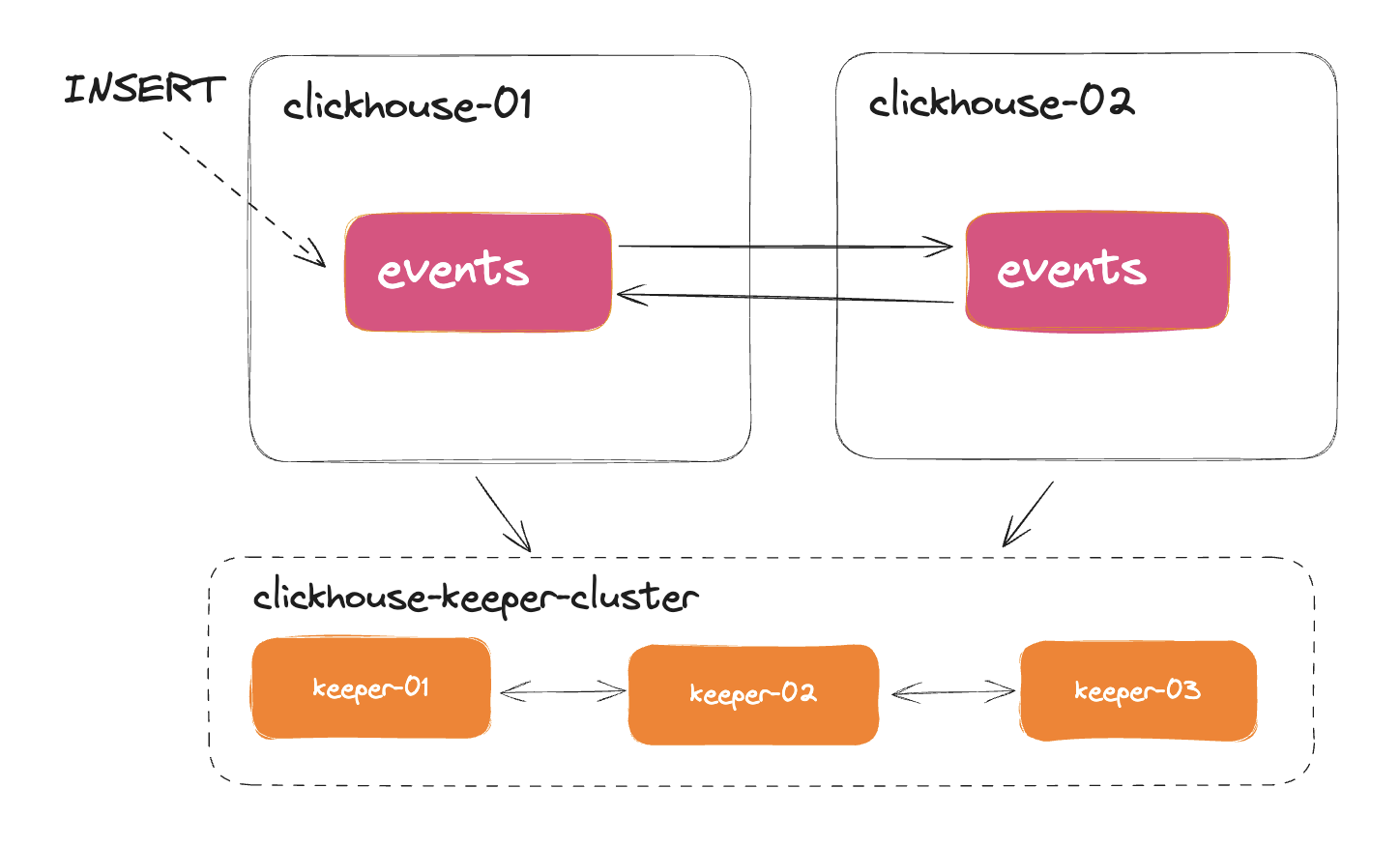
Replication works at the level of an individual table.
Note that Data Replication between nodes is not limited to the `ReplicatedReplacingMergeTree` engine only,
this is just a recommended and the most useful table engine for data engineers.
Replication can support all engines in the MergeTree family.
- ReplicatedMergeTree
- ReplicatedSummingMergeTree
- ReplicatedReplacingMergeTree
- ReplicatedAggregatingMergeTree
- ReplicatedCollapsingMergeTree
- ReplicatedVersionedCollapsingMergeTree
- ReplicatedGraphiteMergeTree
# Cluster setup via ClickHouse Operator
With the previous [clickhouse-operator installed](https://blog.duyet.net/2024/03/clickhouse-on-kubernetes.html), you will need
1. to have **Zookeeper** or **ClickHouse Keeper installed** on your Kubernetes.
2. then, you can modify the single `ClickHouseInstallation` or add a new cluster by configuring it to **connect to the Keeper cluster**.
Following the [document by Altinity here](https://github.com/Altinity/clickhouse-operator/blob/master/docs/zookeeper_setup.md) for setting up Zookeeper, OR install the ClickHouse Keeper using my own [Helm Chart](https://github.com/duyet/charts/tree/master/clickhouse-keeper), which I think is more lightweight than the Java-based Zookeeper.
```bash
$ helm repo add duyet https://duyet.github.io/charts
$ helm install -n clickhouse clickhouse-keeper duyet/clickhouse-keeper
$ kubectl -n clickhouse get po
clickhouse-keeper-0
clickhouse-keeper-1
clickhouse-keeper-2
```
Let create the ClickHouse cluster with 1 shard and 2 replicas and persistent storage as the manifest below:
```yaml
# File: clickhouse-cluster.yaml
apiVersion: clickhouse.altinity.com/v1
kind: ClickHouseInstallation
metadata:
name: cluster
spec:
defaults:
templates:
dataVolumeClaimTemplate: default
podTemplate: clickhouse:24.5
configuration:
zookeeper:
nodes:
- host: clickhouse-keeper-0.clickhouse-keepers.clickhouse.svc
port: 2181
- host: clickhouse-keeper-1.clickhouse-keepers.clickhouse.svc
port: 2181
- host: clickhouse-keeper-2.clickhouse-keepers.clickhouse.svc
port: 2181
clusters:
- name: clickhouse
layout:
shardsCount: 1
replicasCount: 2
templates:
volumeClaimTemplates:
- name: default
spec:
accessModes:
- ReadWriteOnce
resources:
requests:
storage: 500Mi
podTemplates:
- name: clickhouse:24.5
spec:
containers:
- name: clickhouse-pod
image: clickhouse/clickhouse-server:24.5
```
Apply:
```bash
$ kubectl apply -f clickhouse-cluster.yaml
clickhouseinstallation.clickhouse.altinity.com/cluster created
$ kubectl get clickhouseinstallation -n clickhouse
NAME CLUSTERS HOSTS STATUS HOSTS-COMPLETED AGE
cluster 1 1 Completed 35s
$ kubectl get svc -n clickhouse
NAME TYPE CLUSTER-IP PORT(S) AGE
clickhouse-cluster LoadBalancer 10.152.183.156 8123:32286/TCP,9000:30767/TCP 3m45s
chi-cluster-clickhouse-0-0 ClusterIP None <none> 9000/TCP,8123/TCP,9009/TCP 3m47s
chi-cluster-clickhouse-1-0 ClusterIP None <none> 9000/TCP,8123/TCP,9009/TCP 3m47s
```
Now you can access your cluster by connecting to any of them, such as `chi-cluster-clickhouse-0-0` or `chi-cluster-clickhouse-1-0`. The `clickhouse-cluster` service can be used as a load balancer, which also routes to one of the two replica pods.
```bash
$ kubectl port-forward svc/clickhouse-cluster 8123 -n clickhouse
```
# Create Replicated table
Create new table using `ReplicatedReplacingMergeTree` engine with using specified macros, the syntax is:
```sql
CREATE TABLE default.events ON CLUSTER '{cluster}'
(
`event_time` DateTime,
`event_date` Date DEFAULT toDate(event_time),
`user_id` UInt32,
`event_type` String,
`value` String
)
ENGINE = ReplicatedReplacingMergeTree('/clickhouse/tables/{shard}/{database}/{table}', '{replica}')
PARTITION BY toYYYYMM(event_date)
ORDER BY (user_id, event_type, event_time)
```
Operator provides set of ClickHouse [macros](https://clickhouse.com/docs/en/operations/server-configuration-parameters/settings#macros), which are
1. `{installation}` -- ClickHouse Installation name
2. `{cluster}` -- primary cluster name
3. `{replica}` -- replica name in the cluster, maps to pod service name
4. `{shard}` -- shard id
`{database}` and `{table}` is built in macro by ClickHouse.
`/clickhouse/tables/{shard}/{database}/{table}` is a [Zookeeper path](https://zookeeper.apache.org/doc/r3.1.2/zookeeperProgrammers.html). ClickHouse use this to keep track DDL change and data sync between replicas.
`/clickhouse/tables` is a common prefix and ClickHouse recommend using exactly this one.
The path above will be expanded to
- `ReplicatedReplacingMergeTree('/clickhouse/tables/0/default/events', 'chi-cluster-clickhouse-0-0')` on the first node
- `ReplicatedReplacingMergeTree('/clickhouse/tables/0/default/events', 'chi-cluster-clickhouse-1-0')` on the second node
The `ON CLUSTER '{cluster}'` clause will distribute and create the table on every replica. If you don't use this clause, please connect to each node and create the table yourself. Data will be synchronized from another ClickHouse node to the current one if they have the same Zookeeper path.
# Data Insert
Now inserting data into the first node:
```bash
$ kubectl exec chi-cluster-clickhouse-0-0 -- clickhouse client -q "INSERT INTO events (user_id, event_type, event_time, value) VALUES (111, 'click', '2024-07-01 00:00:00', '/home')"
```
And check data in the second node:
```bash
$ kubectl exec chi-cluster-clickhouse-1-0 -- clickhouse client -q "SELECT COUNT() FROM events"
┌─COUNT()─┐
│ 1 │
└─────────┘
```
Or count from all replicas, run this on any node:
```bash
$ kubectl exec chi-cluster-clickhouse-0-0 -- clickhouse client -q "SELECT hostName(), COUNT() FROM clusterAllReplicas(default.events) GROUP BY 1"
┌─hostName()─────────────────┬─count()─┐
│ chi-cluster-clickhouse-0-0 │ 1 │
│ chi-cluster-clickhouse-1-0 │ 1 │
└────────────────────────────┴─────────┘
```
# Manage replication
With `Replicated*MergeTree` tables, you may sometimes see that it is slow to determine if they are up to date with another instance, or how to ensure they are already synchronized. ClickHouse provides some system tables to help us monitor that.
## How many replication jobs are running?
```sql
SELECT
database,
table,
type,
count() AS count_all,
countIf(is_currently_executing) AS count_executing
FROM system.replication_queue
GROUP BY ALL
ORDER BY count_all DESC
┌─database──┬─table──────┬─type─────┬─count_all─┬─count_executing─┐
│ data_lake │ events │ GET_PART │ 9319 │ 0 │
└───────────┴────────────┴──────────┴───────────┴─────────────────┘
```
`count_all` contains number of jobs in the queue need to be done, and `count_executing` is the current number of jobs are running.
Total of count_executing will not large than the [`background_fetches_pool_size`](https://clickhouse.com/docs/en/operations/server-configuration-parameters/settings#background_fetches_pool_size) setting.
```sql
SELECT *
FROM system.metrics
WHERE metric LIKE '%Fetch%'
┌─metric────────────────────┬─value─┬─description──────────────────────────────────────────────────────────────┐
│ ReplicatedFetch │ 32 │ Number of data parts being fetched from replica │
│ BackgroundFetchesPoolTask │ 16 │ Number of active fetches in an associated background pool │
│ BackgroundFetchesPoolSize │ 32 │ Limit on number of simultaneous fetches in an associated background pool │
└───────────────────────────┴───────┴──────────────────────────────────────────────────────────────────────────┘
```
## The `system.replicated_fetches` also contains the detail of fetching tasks
Number of jobs are running:
```sql
SELECT COUNT()
FROM system.replicated_fetches
┌─count()─┐
│ 16 │
└─────────┘
```
The replicated fetches detail:
```sql
SELECT *
FROM system.replicated_fetches
LIMIT 1
FORMAT Vertical
Query id: 14373025-d312-47f4-af9e-63877e8eab36
Row 1:
──────
database: data_lake
table: events
elapsed: 673.575720277
progress: 0.6662606659500931
result_part_name: 20210214_7_7_309
result_part_path: /var/lib/clickhouse/store/e47/e478ebd3-e831-4b23-8e5c-66e3b5320170/20210214_7_7_309/
partition_id: 20210214
total_size_bytes_compressed: 2705400808
bytes_read_compressed: 1802502144
source_replica_path: /clickhouse/tables/data_lake/events/0/replicas/chi-cluster-clickhouse-0-0
to_detached: 0
thread_id: 670
```
## clickhouse-monitoring
All these query above can be easily managed via [clickhouse-monitoring](http://github.com/duyet/clickhouse-monitoring) UI tool. Checking [previous post](https://blog.duyet.net/2024/03/clickhouse-monitoring.html#4-clickhouse-monitoring-ui-dashboard) for installation and usage.
# Converting from MergeTree to ReplicatedMergeTree
Options here are:
1. For small table, create new replicated table then copy data via: `INSERT INTO SELECT` then drop the old table.
```sql
CREATE TABLE replicated_events ON CLUSTER '{cluster}' ...
INSERT INTO replicated_events SELECT * FROM events;
```
2. For larger table, create new replicated table then COPY parts from the old table to the new one. This can be done by [`ATTACH PARTITION FROM`](https://clickhouse.com/docs/en/sql-reference/statements/alter/partition#attach-partition-from) command.
```sql
CREATE replicated_events ON CLUSTER '{cluster}'
AS events -- copy the structure from the old table
ENGINE = ReplicatedReplacingMergeTree -- change the engine
PARTITION BY toYYYYMM(event_date)
ORDER BY (user_id, event_type, event_time);
SELECT DISTINCT format('ALTER TABLE replicated_events ATTACH PARTITION ID {} FROM events;', partition_id) FROM system.parts WHERE table = 'events';
-- Copy and execute the output of the above query to attach all parts
ALTER TABLE replicated_events ATTACH PARTITION ID 20230217_11_11_143 FROM events;
ALTER TABLE replicated_events ATTACH PARTITION ID 20230218_41_41_222 FROM events;
...
```
3. If you understand and can modify the file system, you can directly perform some file manipulation by renaming the old existing MergeTree table, then creating a `ReplicatedMergeTree` table with the old name. Move all the old data parts to the `detached` folder, then ClickHouse will automatically attach them to the new table.
```sql
-- Rename the old table
-- /var/lib/clickhouse/data/default/events_old
RENAME TABLE events TO events_old;
-- Create new replicated table
-- /var/lib/clickhouse/data/default/events
CREATE TABLE events ON CLUSTER '{cluster}'
AS events_old ...;
```
Copy all parts from the old table to the new one:
```bash
mkdir -p /var/lib/clickhouse/data/default/events/detached
mv /var/lib/clickhouse/data/default/events_old/* /var/lib/clickhouse/data/default/events/detached/
```
Run `ALTER TABLE ATTACH PARTITION` to attach all parts or restart the ClickHouse server will automatically attach them.
4. Do a backup of `MergeTree` and recover as `ReplicatedMergeTree`. [See example here](https://github.com/AlexAkulov/clickhouse-backup/blob/master/Examples.md#how-to-convert-mergetree-to-replicatedmegretree)
# Replication Performance Tuning
Parts will be fetched immediately or during hours or days, depending on your table size.
If you see the replication is too slow, consider checking the `system.replication_queue` table, which shows the entries with `postpone_reason`.
```sql
SELECT
type,
postpone_reason
FROM system.replication_queue
WHERE is_currently_executing = 0
LIMIT 5
Query id: 64130c98-9536-4c41-abe3-5f26a27a2ffb
┌─type─────┬─postpone_reason──────────────────────────────────────────────────────────────────────────────┐
│ GET_PART │ Not executing fetch of part 20230217_11_11_143 because 16 fetches already executing, max 16. │
│ GET_PART │ Not executing fetch of part 20230218_41_41_222 because 16 fetches already executing, max 16. │
│ GET_PART │ Not executing fetch of part 20230221_7_7_81 because 16 fetches already executing, max 16. │
│ GET_PART │ Not executing fetch of part 20230228_11_11_42 because 16 fetches already executing, max 16. │
│ GET_PART │ Not executing fetch of part 20230311_3_3_141 because 16 fetches already executing, max 16. │
└──────────┴──────────────────────────────────────────────────────────────────────────────────────────────┘
```
This is mostly ok because the maximum replication slots just are being used.
In case you believe your cluster can handle more than that, consider to increase the pool size
[`background_fetches_pool_size`](https://clickhouse.com/docs/en/operations/server-configuration-parameters/settings#background_fetches_pool_size)
```xml
<yandex>
<background_fetches_pool_size>32</background_fetches_pool_size>
<yandex>
```
The `MergeTree` setting [`replicated_max_parallel_fetches_for_host`](https://clickhouse.com/docs/en/operations/settings/merge-tree-settings#replicated_max_parallel_fetches_for_host) also limits that (default: 15) and is not well-documented. We should also consider increasing that.
```xml
<yandex>
<profile>
<default>
<replicated_max_parallel_fetches_for_host>32</replicated_max_parallel_fetches_for_host>
</default>
</profile>
<yandex>
```
The [`replicated_fetches_http_connection_timeout`](https://clickhouse.com/docs/en/operations/settings/merge-tree-settings#replicated_fetches_http_connection_timeout) and [`replicated_fetches_http_receive_timeout`](https://clickhouse.com/docs/en/operations/settings/merge-tree-settings#replicated_fetches_http_receive_timeout) sometimes helps if you see a lot of timeout errors in the ClickHouse logs, but wouldn't it be better to reduce the pool size instead.
```xml
<yandex>
<profile>
<default>
<replicated_fetches_http_connection_timeout>30</replicated_fetches_http_connection_timeout>
<replicated_fetches_http_receive_timeout>180</replicated_fetches_http_receive_timeout>
</default>
</profile>
<yandex>
```
# References
- [Data Replication - ClickHouse Documentation](https://clickhouse.com/docs/en/engines/table-engines/mergetree-family/replication/)
- [Setup ClickHouse cluster with data replication](https://github.com/Altinity/clickhouse-operator/blob/master/docs/replication_setup.md)
- [Update ClickHouse Installation - add replication to existing non-replicated cluster](https://github.com/Altinity/clickhouse-operator/blob/master/docs/chi_update_add_replication.md)
- [Converting MergeTree to Replicated](https://kb.altinity.com/altinity-kb-setup-and-maintenance/altinity-kb-converting-mergetree-to-replicated/)