ClickHouse Rust UDFs
MarkdownView HTML version
In Data Platform System with ClickHouse, rather than extracting data from ClickHouse for processing in external systems, we can perform transformations directly within ClickHouse itself. ClickHouse can call any external executable program or script to process data. My idea is using custom **User-Defined Functions (UDFs) written in Rust** to handle data transformations between tables.
This approach can significantly improve performance and reduce data movement, leading to more efficient data processing pipelines.
```sql
SELECT customTransform(data) FROM raw_events;
```
- [Implementation: `extract-url`](#implementation-extract-url)
- [Configurate ClickHouse](#configurate-clickhouse)
- [Advances](#advances)
- [`executable_pool`](#executable_pool)
- [Functions with constant parameters](#functions-with-constant-parameters)
- [More examples](#more-examples)
- [References](#references)
For example, if you are using [dbt](https://www.getdbt.com), it can move and process data from tables to tables without data leaving the cluster.
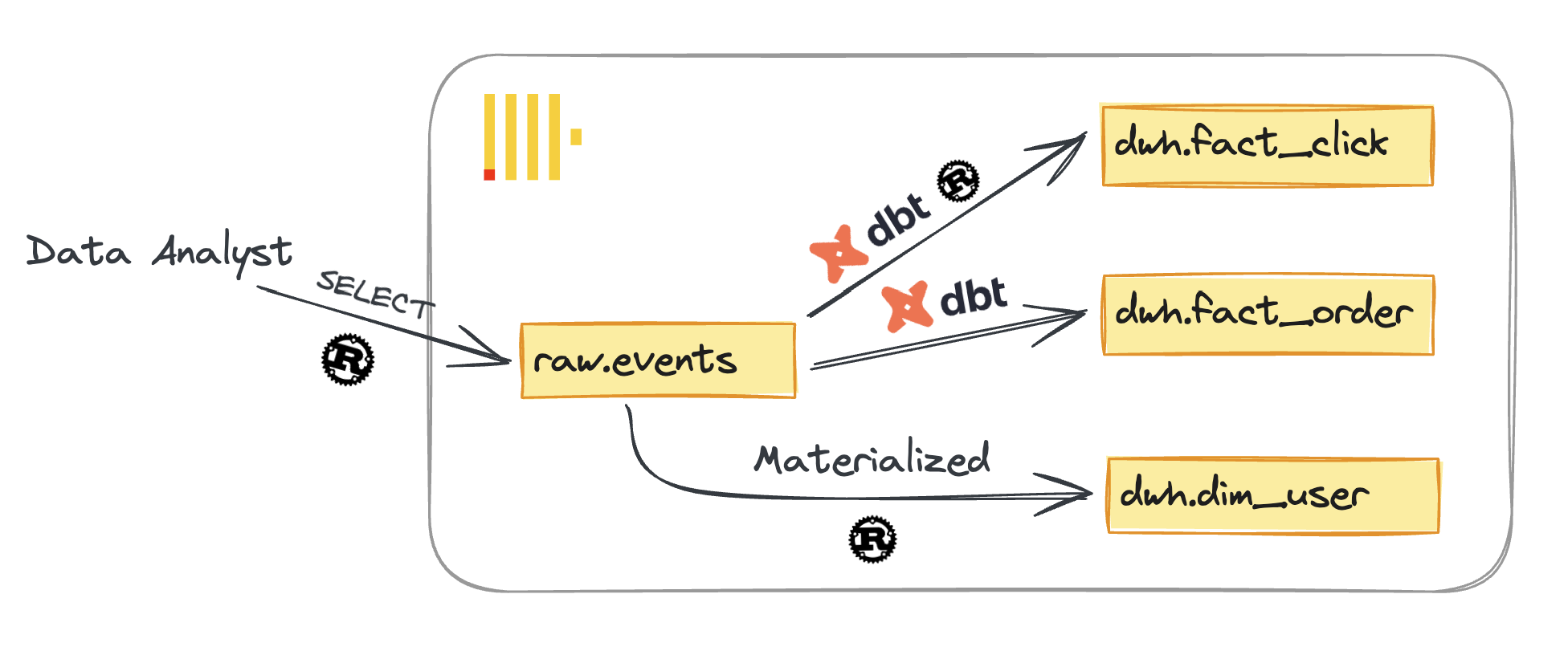
You might find many documents and blog posts about executable ClickHouse UDFs using Python or Bash scripts. However, I will provide you with the Rust approach for high performance and complex logic in your codebase, or to take advantage of the large number of **[Rust crates](https://crates.io/)** available for data processing. You can also expose the transformation logic as a set of simple functions that everyone can use as SQL functions.
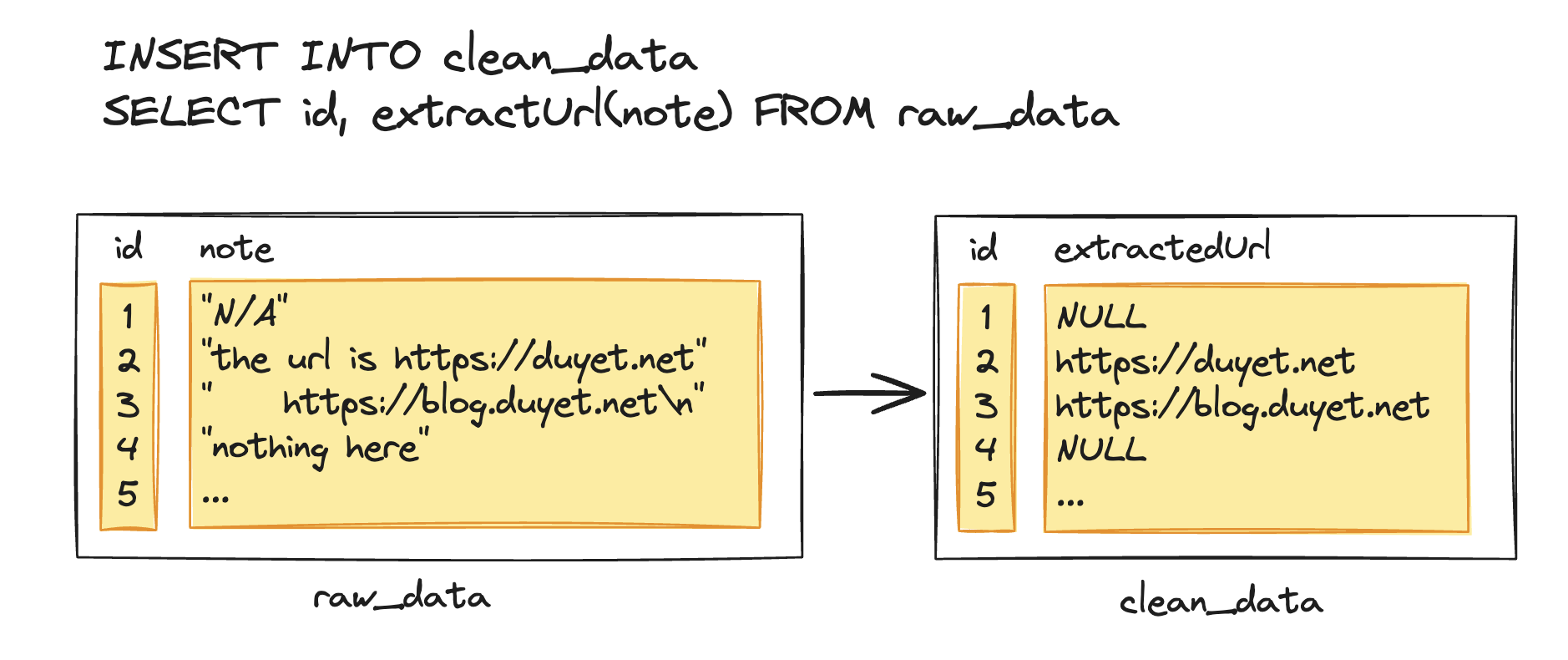
To demonstrate, I will implement the **`extractUrl()`** function. This function will examine the unclean `String` column and return the **first URL** it finds in it, or return **NULL** if none is found.
Now let's implement it.
# Implementation: `extract-url`
For data input and output, ClickHouse supports several formats including `TabSeparated`, `JSON`, and `Native`. The command must read arguments from **STDIN** and output the result to **STDOUT**.
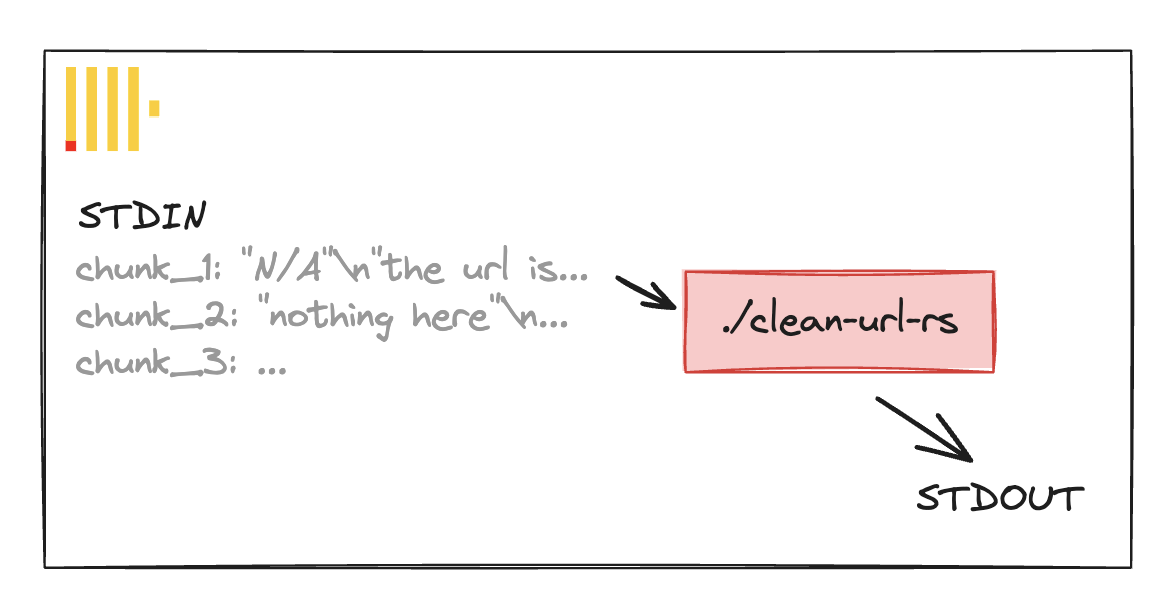
So the Rust executable would read the function arguments from standard input in the specified format, process them, and write the result back to standard output in the specified return type format.
ClickHouse would send the data in chunks, and the Rust process would need to handle arguments iteratively in a streaming fashion.
Let's implement the `extract-url` binary step by step:
1. Init the project:
```bash
cargo new extract-url
cd extract-url
```
2. Add the necessary dependencies and `[[bin]]` configuration to `Cargo.toml`:
```toml
[package]
name = "url"
version = "0.1.0"
edition = "2021"
[[bin]]
name = 'extract-url'
path = 'src/bin/extract-url.rs'
# Will combine to target/debug/extract-url
[dependencies]
anyhow = "1.0.82"
```
3. Implement the main logic in `src/bin/extract-url.rs`
```rust
use anyhow::Result;
use shared::io::process_stdin;
use std::boxed::Box;
use std::io::{self, BufRead, Write};
pub type ProcessFn = Box<dyn Fn(&str) -> Option<String>>;
/// Returns the index to the start and the end of the URL
/// if the the given string includes a
/// URL or alike. Otherwise, returns `None`.
pub fn detect_url(s: &str) -> Option<(usize, usize)> {
let patterns = vec!["http://", "https://", "ftp://", "ftps://", "file://"];
for pattern in patterns {
match s.find(pattern) {
Some(pos) => {
let end = s
.chars()
.skip(pos + pattern.len())
.position(|g| is_whitespace(g.to_string().as_str()))
.unwrap_or(s.len() - pos - pattern.len());
return Some((pos, pos + end + pattern.len()));
}
None => continue,
}
}
None
}
pub fn extract_url(s: &str) -> Option<String> {
detect_url(s).map(|(start, end)| s[start..end].to_string())
}
pub fn process_stdin(f: ProcessFn) {
let stdin = io::stdin();
for line in stdin.lock().lines() {
// Getting input from stdin line
let input = line.unwrap_or_default();
// Processing input
let output = f(&input).unwrap_or_default();
// Stdout
println!("{}", output);
}
}
fn main() -> Result<()> {
process_stdin(Box::new(extract_url));
Ok(())
}
```
Add unittest:
```rust
#[cfg(test)]
mod tests {
use super::*;
const TEST_CASES: [(&str, Option<&str>); 16] = [
("http://example.org", Some("http://example.org")),
("https://example.org", Some("https://example.org")),
("ftp://example.org", Some("ftp://example.org")),
("ftps://example.org", Some("ftps://example.org")),
("file://example.org", Some("file://example.org")),
(
"aaa http://example.org something",
Some("http://example.org"),
),
(
"aaa https://example.org something",
Some("https://example.org"),
),
("aaa ftp://example.org something", Some("ftp://example.org")),
(
"aaa ftps://example.org something",
Some("ftps://example.org"),
),
(
"aaa file://example.org something",
Some("file://example.org"),
),
("https://example.org something", Some("https://example.org")),
(
"https://example.org/abc/deff something",
Some("https://example.org/abc/deff"),
),
("aaa ftp://example.org something", Some("ftp://example.org")),
("file://example.org", Some("file://example.org")),
("aaa http not an url", None),
("", None),
];
#[test]
fn test_extract_url() {
for (input, expected) in TEST_CASES.iter() {
assert_eq!(
extract_url(input),
expected.map(|s| s.to_string()),
"expected extract_url({:?}) to be {:?} but got {:?}",
input,
expected,
extract_url(input)
);
}
}
}
```
Run the test and build your executable:
```bash
cargo test
cargo build --release
```
Copy the binary to ClickHouse's script directory:
```bash
sudo cp target/release/extract-url /var/lib/clickhouse/user_scripts/
sudo chown clickhouse:clickhouse /var/lib/clickhouse/user_scripts/extract-url
sudo chmod 755 /var/lib/clickhouse/user_scripts/extract-url
```
The `user_scripts_path` setting defines the directory for user script files, which is `/var/lib/clickhouse/user_scripts` by default. You will also need to copy the binary to all instances if you have a cluster with more than one machine.
# Configurate ClickHouse
To add a UDF following the [Executable User Defined Functions](https://clickhouse.com/docs/en/sql-reference/functions/udf#executable-user-defined-functions) document, the configuration of executable user-defined functions can be located in one or more **xml** files. The path to the configuration is specified in the [user_defined_executable_functions_config](https://clickhouse.com/docs/en/operations/server-configuration-parameters/settings#server_configuration_parameters-user_defined_executable_functions_config) parameter.
```xml
<user_defined_executable_functions_config>*_function.xml</user_defined_executable_functions_config>
```
So we put the UDF in `/etc/clickhouse-server/config.d/extract_url_function.xml`:
```xml
<functions>
<function>
<type>executable</type>
<name>extractUrl</name>
<return_type>Nullable(String)</return_type>
<argument>
<type>Nullable(String)</type>
<name>value</name>
</argument>
<format>TabSeparated</format>
<command>extract-url</command>
</function>
</functions>
```
After reload function you will see new function in your cluster:
```sql
SYSTEM RELOAD FUNCTIONS;
SELECT name, origin FROM system.functions WHERE name LIKE '%extractUrl%';
┌─name───────┬─origin────────────────┐
│ extractUrl │ ExecutableUserDefined │
└────────────┴───────────────────────┘
```
The Rust executable would be the "external executable program" that ClickHouse calls upon a ClickHouse SQL invocation. Selecting from `extractUrl` will invoke the `/var/lib/clickhouse/user_scripts/extract-url` binary.
```sql
-- Basic
SELECT extractUrl("from https://example.org") as extracted
┌─extracted───────────┐
│ https://example.org │
└─────────────────────┘
```
```sql
-- Extract from a table
SELECT
id,
extractUrl(content) as extracted_url
FROM raw.events;
```
```sql
-- Extract and insert to another table
INSERT INTO dwh.fact_click
SELECT
id,
extractUrl(content) as extracted_url
FROM raw.events;
```
# Advances
## `executable_pool`
For higher performance, ClickHouse can maintain a pool of the Rust process and distribute work across them.
If `type` is set to `executable` then single command is started. If it is set to `executable_pool` then a pool of commands is created.
```xml
<functions>
<function>
<type>executable_pool</type>
<name>extractUrl</name>
<return_type>Nullable(String)</return_type>
<argument>
<type>Nullable(String)</type>
<name>value</name>
</argument>
<format>TabSeparated</format>
<command>extract-url</command>
</function>
</functions>
```
Some other settings like max execution time, timeouts, pool size would control the UDF execution and resource usage.
The Rust executable would be spawned by ClickHouse on demand to process each chunk of data. It runs independently of ClickHouse with I/O streaming between them.
## Functions with constant parameters
For example, if you have the function like below:
```sql
SELECT getTopWord(3)('aa bb aa bb cc')
```
With `(3)` as the constant parameter, similar to `getTopWord(top=3, 'aa bb aa bb cc')` in some programming languages.
Executable user-defined functions can take constant parameters configured in the `command` setting (this works only for user-defined functions with the `executable` type). It also requires the `execute_direct` option (to ensure no shell argument expansion vulnerability).
```xml
<functions>
<function>
<type>executable</type>
<execute_direct>true</execute_direct>
<name>getTopWord</name>
<return_type>String</return_type>
<argument>
<type>UInt64</type>
</argument>
<format>TabSeparated</format>
<command>./get-top-word {test_parameter:UInt64}</command>
</function>
</functions>
```
## More examples
More examples can be found in my repo at https://github.com/duyet/clickhouse-udf-rs, including:
- How to create a shared library and IO interface
- How to conduct tests
- How to set up CI (GitHub Actions) for your UDF repo
# References
- [UDFs User Defined Functions](https://clickhouse.com/docs/en/sql-reference/functions/udf)
- [clickhouse-udf-rs](https://github.com/duyet/clickhouse-udf-rs/) - example repo
- [Series: ClickHouse on Kubernetes](/series/clickhouse-on-kubernetes)